
Your website is finished and online.
The pages open correctly, the mobile version works, the sitemap has been created, and the basic SEO setup is in place.
But there is a simple question:
How do you know whether Google has actually found your website?
You can open Google, search for your company name, and look at the results. But that only tells you a small part of the story.
Google Search Console lets you look deeper.
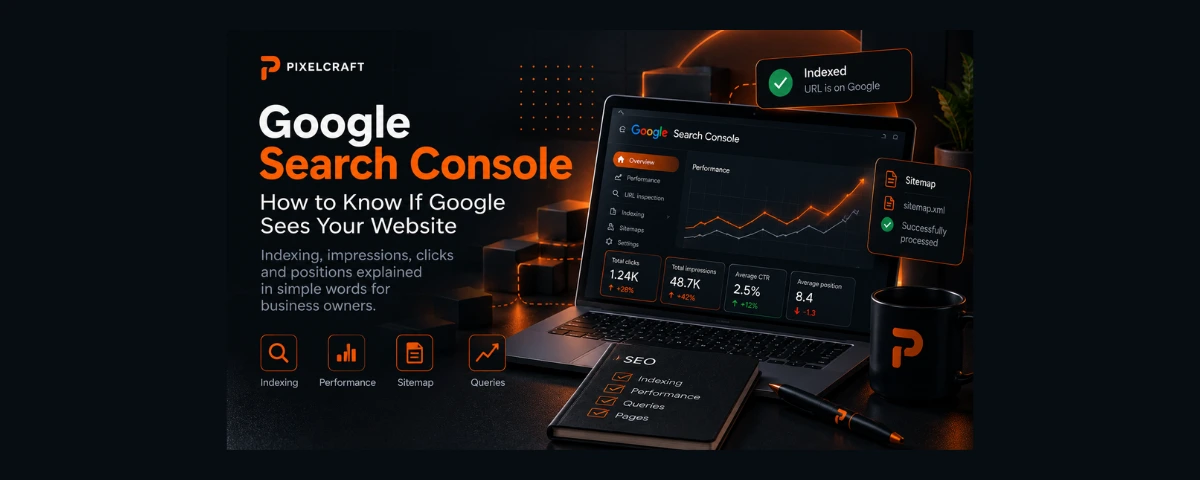
It can show you which pages Google has discovered, which pages have been indexed, which search queries are already causing your website to appear in Google, and whether people are clicking through to your site.
Search Console does not promote your website or "turn on SEO."
It is better to think of it as a window that lets a website owner see what is happening between their website and Google Search.
What is Google Search Console in simple terms?
In the previous article, we compared the internet to an enormous city and Google to a system that constantly explores that city and updates its map.
Let's continue with the same analogy.
You have opened a shop.
Google already knows the street where the shop is located. Perhaps Google's mapmaker has even passed by and added the building to the map.
But as the owner, you would probably like to know:
- Has Google noticed my shop?
- Which address does it consider the main one?
- Which parts of the building was it able to access?
- Are any important doors closed?
- Which searches cause people to see my shop?
- How many people saw it?
- How many of them actually decided to enter?
Google Search Console can be thought of as the shop owner's dashboard inside Google Search.
It does not tell you everything visitors do on your website.
There are other tools for that, such as Google Analytics.
Search Console mainly answers a different question:
How is my website represented in Google Search?
Why does a business owner need Search Console?
You do not need to be an SEO specialist to use Search Console.
A small business owner certainly does not need to spend every day studying dozens of reports.
But there are a few things that are genuinely useful to know.
For example:
- Does Google know about the website?
- Are the important pages indexed?
- Are there any obvious problems?
- Is the website beginning to appear for search queries?
- Are impressions increasing?
- Are clicks starting to appear?
- Which pages does Google show most often?
- What searches are people using to find the website?
Search Console turns:
"I think Google should be able to see my website by now."
into something you can actually check.
It starts with Google discovering the page
Imagine that you have just published a new page:
"Hair Colouring"
For you, the page already exists.
You can open it using its URL.
But Google still has to discover that the URL exists.
A search engine can discover a page in different ways, for example through links from other pages or through a sitemap.
After discovering the URL, Google may visit the page — a process commonly called crawling.
Google then processes the information it finds and may add the page to its index.
In simplified form, the journey looks like this:
page published → Google discovers the URL → Google crawls the page → Google processes it → the page may be indexed → the page may appear in search results.
This is not one instant operation.
What is the Google index?
Let's return to the library analogy.
There are 1,000 books physically sitting on the shelves.
But the library catalogue only knows about 900 of them.
The other books exist, but you cannot find them through the catalogue.
In very simple terms, Google's index can be imagined as an enormous catalogue of pages that Google knows about and can consider for search results.
That is why there is an important difference between:
a page exists on the internet
and
a page is in Google's index.
They are not the same thing.
How can I see which pages Google has indexed?
Search Console includes a Page indexing report.
It helps you see which URLs known to Google are indexed and which are not.
And this is where a common misunderstanding appears.
Imagine:
your website has 25 URLs, but Search Console shows only 18 as indexed.
The first reaction might be:
"Seven pages are missing! Something is wrong!"
Not necessarily.
Google itself explains that having non-indexed URLs is not automatically a problem. They may include duplicate URLs or pages that you intentionally do not want indexed.
A real website can contain URLs that do not need to appear in search at all.
So the better question is not:
"Is absolutely every URL indexed?"
but:
"Are the pages my customers should be able to find indexed?"
The homepage?
Important service pages?
Useful articles?
Product pages?
Those are the pages worth paying attention to.
Why might a page not be indexed?
There can be many reasons.
For example:
- Google has not processed a new page yet;
- the page is blocked from indexing;
- Google considers another URL to be the main version;
- the page is a duplicate;
- Google cannot access the page correctly;
- the URL redirects somewhere else;
- Google discovered the page but has not added it to the index.
So the status "not indexed" does not explain the whole situation by itself.
You need to look at the reason.
This is where another Search Console tool becomes particularly useful.
What is URL Inspection?
Imagine that instead of asking:
"What does Google know about my entire building?"
you choose one exact address and ask:
"Do you know this particular door?"
That is essentially what URL Inspection is for.
You can enter a specific URL in Search Console and see information Google has about that page.
Depending on the URL and its status, this can include information such as:
- whether the URL is indexed;
- when Google last crawled it;
- whether Google was able to retrieve it;
- which canonical URL Google selected;
- sitemap information;
- indexing-related issues.
You can also test the current live version of the URL.
For a website owner, this is especially useful for a very simple question:
"I published an important page. Does Google know about it?"
What does "Request indexing" mean?
URL Inspection also allows you to request indexing for a page.
You can imagine this as telling the librarian:
"We have a new book. Could you please take a look at it?"
But there is an important limitation.
Requesting indexing does not mean Google is required to add the page to its index.
For many new or updated pages, a sitemap is the more appropriate way to help Google discover them.
So there is no reason to open Search Console every day and repeatedly press Request indexing for the same page.
It is not a:
"Rank this page higher"
button.
It is simply a way to ask Google to take another look at a URL.
Why do we need a sitemap then?
In the previous article, we compared a sitemap to a map of a building.
Now that analogy becomes practical.
Instead of separately telling the mapmaker:
"I have room number 1."
Then:
"There is also room number 2."
And later:
"Don't forget room number 3."
you provide a map of the building.
A sitemap tells search engines about important URLs on your website.
In Search Console, you can submit a sitemap and check whether Google was able to process it.
But once again, submitting a sitemap does not mean:
"Google must index every page listed here."
It is closer to saying:
"Here are the important addresses on my website that I want you to know about."
Google has found the website. What happens next?
This is where one of the most interesting parts of Search Console begins.
Your website may still receive almost no visitors.
But Search Console can already show the first signs that its pages are beginning to appear in Google Search.
The Performance report contains four metrics that are especially useful to understand:
Clicks
Impressions
CTR
Average Position
At first, they may sound like marketing terminology.
In reality, the basic idea behind each one is quite simple.
What are Impressions?
Imagine our hair salon again.
Someone searches for:
"hair colouring"
Google displays the search results.
A page from your salon appears among them.
The person may not click it.
They may choose a competitor instead.
But your result appeared in Google.
That is the basic idea behind an impression.
The exact way Google counts impressions can vary depending on the type of search result, but for a business owner the main idea is simple:
your result had an opportunity to be seen in Google Search.
This makes impressions particularly interesting for a new website.
You might have:
0 clicks, but 50 impressions.
That does not automatically mean SEO is failing.
On the contrary, it may be one of the first signs that Google has started showing your pages for certain searches.
What are Clicks?
This part is simpler.
Someone sees your search result and clicks through to your website.
That is a click.
If impressions are like people seeing your shop sign, clicks are the people who decide to open the door.
For example:
1,000 impressions
50 clicks
means that results from your website were shown a certain number of times and some of those impressions resulted in visits to the site.
But clicks alone do not tell you whether those visitors became customers.
Once someone arrives on the website, a different part of the story begins: what they do there.
That is where analytics tools become useful.
What is CTR?
CTR stands for Click-Through Rate.
It shows the relationship between clicks and impressions.
In simplified form:
CTR = Clicks ÷ Impressions × 100%
For example:
1,000 impressions
50 clicks
CTR = 5%
So around 5% of those impressions resulted in a click.
But there is another trap here.
There is no single "good CTR" that applies to every website.
CTR can vary considerably depending on:
- the search query;
- the position of the result;
- the type of search result;
- brand recognition;
- what the user is trying to accomplish;
- how well the title and search result match the query.
That is why CTR is more useful when viewed in the context of a particular page or query and compared over time.
What is Average Position?
This is one of the easiest Search Console metrics to misunderstand.
Suppose Search Console shows:
Average Position: 8.4
It is tempting to read this as:
"My website is number eight on Google."
But that is not quite what it means.
Positions can vary between queries, users, and individual impressions.
Search Console calculates Average Position from the position of your site's topmost result for the relevant impressions.
Imagine:
for one query your page appeared in position 3;
for another, position 9;
for another, position 18.
An average combines these different situations into one number.
That is why Average Position is generally more useful for observing a trend than for treating it as the permanent exact position of your website in Google.
A manual Google search may also show you a different result.
Why do I see a different position when I search for my own website?
That is completely normal.
You open Google, enter a query, and see your website, for example, in fifth place.
Search Console shows Average Position 9.2.
That does not necessarily mean something is wrong.
Search Console aggregates data from many actual search impressions.
Your own Google search is one particular search at one particular moment.
Search results can vary depending on circumstances, including the user's location.
So manually checking:
"Where is my website right now?"
does not replace Search Console data.
What are Queries?
This is where Search Console becomes particularly interesting for a business owner.
Queries show the searches for which your website appeared in Google Search.
Imagine you own a hair salon.
You assumed people would find you by searching:
"hair salon"
But Search Console begins showing impressions for:
"grey hair colouring"
"balayage price"
"women's haircut near me"
That is useful business information.
You are no longer only seeing how you describe your services.
You are beginning to see how potential customers search for them.
This is one of the points where SEO stops being only a collection of technical settings and starts becoming a way to understand real search demand.
What does the Pages section show?
Queries answers:
"What were people searching for?"
Pages answers a different question:
"Which of my pages did Google show?"
You may discover that most search impressions are not going to the homepage at all.
Instead, a specific service page or article may be receiving the visibility.
That is perfectly normal.
A user does not need to begin every visit on your homepage.
If they are looking for a specific service, the best search result may be the page dedicated to that service.
So it is useful to think of a website not only as:
Homepage → menu → other pages
but also as a collection of individual entrances from search.
What if Impressions increase but Clicks stay low?
This is already an interesting signal to investigate.
For example:
Impressions increased from 100 to 1,000
but clicks barely changed.
That does not automatically mean:
"SEO is broken."
There can be many explanations:
- the website is appearing for more queries;
- positions may still be relatively low;
- the search result may not match the user's expectations well enough;
- the title may need to be clearer;
- the site may be appearing for queries with a different search intent;
- impressions may have increased for very broad searches.
Search Console gives you the signal.
Understanding the reason still requires context.
What if Clicks are increasing?
That means more visits are actually coming to your website from Google Search.
But even then, it is worth looking beyond the number itself.
Imagine:
you previously had 20 clicks;
now you have 200.
That is useful growth.
But the next business question is:
What did those 200 visitors do?
Did they view one page and leave?
Did they call?
Did they submit a form?
Did they book an appointment?
Did they buy something?
Search Console answers:
"How did people arrive from Google Search?"
To answer:
"What happened after they arrived?"
you need other information, such as web analytics and properly configured events.
What can a new website look like in Search Console?
Very roughly, the development may look something like this.
At first, almost nothing
The website has just been published.
Google is still discovering pages and processing information.
The Performance report may contain very little data.
That alone is not a reason to panic.
Then the first Impressions appear
The website starts appearing for individual searches.
There may still be no clicks at all.
But now you can already see:
Google has started associating my pages with certain searches.
Then the first Clicks appear
Some users begin visiting the website from Google.
Now you can start seeing which queries and pages are responsible for those visits.
Gradually, a history develops
You can begin comparing periods.
For example:
- Are impressions increasing?
- Are clicks increasing?
- Which pages are gaining visibility?
- Which new queries are appearing?
- How is CTR changing?
- Is Average Position changing noticeably?
A trend over time is usually far more useful than one number from one day.
This does not mean every new website will go through these stages on the same schedule.
The example describes a possible sequence, not an SEO timetable or promise.
Do I need to check Search Console every day?
For most small business owners — no.
If the website is technically healthy and there is no active SEO campaign requiring close monitoring, watching every number every day usually creates more noise than useful information.
Search performance fluctuates.
One day may be stronger than another.
Weekends can behave differently from weekdays.
Some searches are seasonal.
It is generally more useful to look at trends over longer periods and compare similar time ranges.
Search Console is a monitoring and diagnostic tool, not a stock-market terminal that needs to stay open all day.
What does Search Console NOT do?
Understanding this is just as important as knowing what the tool can do.
Search Console does not automatically promote your website
Connecting a website to Search Console does not improve its rankings by itself.
Search Console is not Google Analytics
Search Console primarily shows information about your website's presence in Google Search.
Analytics is used to understand visitor behaviour on the website and traffic from different sources.
Submitting a sitemap does not guarantee indexing
A sitemap helps Google discover important URLs.
Google still decides which pages to index.
Request indexing does not mean "rank this higher"
The feature asks Google to take another look at a URL.
It is not a ranking tool.
Good Search Console numbers do not automatically mean sales
Impressions and clicks are useful measures of search visibility.
But ultimately a business needs real customer actions.
Which data should a business owner actually look at?
If you do not want to become an SEO specialist, start with just a few questions:
1. Are my important pages indexed?
2. Are Impressions increasing over time?
3. Am I getting Clicks from Google Search?
4. Which Queries are bringing up my website?
5. Which Pages are gaining search visibility?
6. Do those queries actually match what my business offers?
That alone gives you a much more objective picture than:
"I searched for my company name and I think I found the website."
When should I contact a developer or SEO specialist?
Not every warning in Search Console means there is a serious problem.
But it is worth investigating when, for example:
- an important page remains unindexed for a long time;
- Google cannot access an important page;
- important pages unexpectedly disappear from the index;
- Google selects a different canonical than expected;
- the sitemap can no longer be processed;
- search impressions drop sharply after changes to the website;
- systematic technical problems appear and you do not know what they mean.
One of the most useful things about Search Console is that it lets you start the conversation not with:
"I think something is wrong with Google."
but with specific information:
"This important page is not indexed, and Search Console gives this reason."
That is a much more useful starting point for a developer.
Should Search Console be connected when a website is launched?
If organic visibility in Google matters to the business, connecting it early is sensible.
Not because Search Console itself improves SEO.
But because data can begin accumulating and you can observe the website's development from the beginning.
It is a little like installing a dashboard in a car.
The dashboard does not make the car go faster.
But without it, understanding what is happening becomes much more difficult.
What should I do after connecting Search Console?
You do not need to do anything complicated at first.
It is enough to make sure that:
- ownership of the website has been verified;
- Google can access important pages;
- the sitemap is available and submitted when appropriate;
- important pages gradually appear in the index;
- Performance data begins to appear over time.
After that, Search Console changes from a setup tool into a monitoring tool.
And the accumulated data leads naturally to the next question:
Google knows about my website — so why doesn't it show it higher?
My website is indexed. Why can nobody find it?
This is the logical next question.
Imagine:
the page is in Google's index;
Search Console shows Impressions;
Google clearly knows that the page exists.
But there are almost no clicks.
Perhaps the page appears too far down the results.
Perhaps the query is highly competitive.
Perhaps the content does not answer the user's search intent well enough.
Perhaps other search results look more useful.
This is where the question:
"Can Google see my website?"
ends, and another begins:
"Why should Google show my website above the alternatives?"
That will be the subject of the next article.
FAQ
What is Google Search Console?
Google Search Console is a free Google service that helps website owners monitor their site's presence in Google Search, check indexing, and analyse search performance.
Does Search Console improve SEO?
Connecting Search Console does not improve rankings by itself.
It is a monitoring, analysis, and diagnostic tool.
It helps you understand how Google interacts with the website and identify possible problems.
How can I check whether a specific page is indexed?
You can use URL Inspection in Search Console.
It provides information about a specific URL, including whether Google has indexed it.
Does every page on my website need to be indexed?
No.
Some URLs may intentionally be excluded from indexing, may be duplicates, or may redirect elsewhere.
The important thing is that the pages users should find through search are accessible and eligible for indexing.
What are Impressions in Search Console?
Impressions indicate how often a result from your website was shown in Google Search according to Google's reporting rules.
What are Clicks?
Clicks represent visits from Google Search results to your website according to Search Console's reporting rules.
What is CTR?
CTR is the percentage of impressions that resulted in clicks.
If your result received 1,000 impressions and 50 clicks, the CTR is 5%.
What does Average Position mean?
Average Position is based on the position of your site's topmost result for the relevant impressions.
It should not be interpreted as one permanent exact ranking because positions can vary between searches and impressions.
Do I need to check Search Console every day?
For most small websites, no.
Looking at trends over a longer period is usually more useful than reacting to daily fluctuations.
Do I need to manually request indexing for every new page?
Usually not.
A sitemap is useful for helping Google discover multiple new or updated URLs. URL Inspection and Request indexing can be useful for individual pages.
If URL Inspection says "URL is on Google", does that mean the page will definitely appear in search results?
No.
It means the URL is indexed and is eligible to appear in Google Search. It does not guarantee that the page will appear for a particular query.
Read also
If you are just beginning to understand search optimization, start with “What Is SEO and Why Does Your Business Need It? A Simple Explanation Without Technical Jargon”.
If you are considering building your website yourself with AI, read “Why Pay a Developer If AI Can Build a Website?”.
If you are still choosing how your website should be built, read “WordPress, Website Builder or Custom Development: Which Is Right for Your Business?”.
Sources and methodology
This article was prepared on September 26, 2026.
Current official Google Search Console documentation was used for information about Search Console, Page indexing, URL Inspection, sitemaps, and Performance metrics.
The article is intended for business owners and deliberately uses simplified analogies. These analogies are designed to explain the purpose of the tools and should not be treated as their formal technical definitions.
The Search Console interface and its reports can change over time, so Google's current documentation should be checked when working with a specific feature.
Main sources: