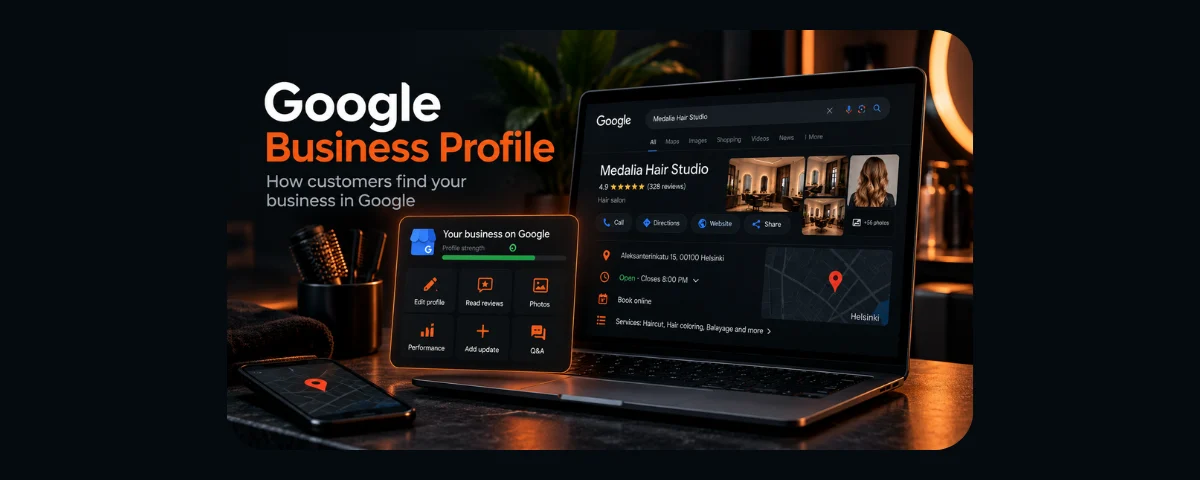

Try typing your business name into Google. Not your website address, but the name someone might remember after hearing about you from a friend.
What comes up?
You might see a business listing alongside the usual search results, complete with photos, an address, opening hours, a phone number and reviews. Perhaps Google knows about your company but shows an old address. Or maybe there is no business listing at all — just your website and a few directory entries.
The interesting part is that the listing may exist even if you never created it. Google gathers information from different sources, and people can upload photos or suggest changes.
So who keeps that information accurate? And can you influence what a potential customer sees?
That is where Google Business Profile comes in. It is Google's free tool for managing information about a business in Google Search and Google Maps. You may remember its previous name, Google My Business.
Let's look at who can use it, how to take control of an existing listing and what to do once the basic setup is finished. Throughout the article, we'll follow Kampaamo Koivunvalo, a fictional hair salon in Salo, Finland. No such business has been registered for this guide; its details and illustrations are purely educational.
How does Google know your business exists?
Imagine Kampaamo Koivunvalo has been operating for a few years. The salon has a website and a social media page, but its owner has never opened Google Business Profile.
A listing could still appear in Google Search.
Google uses publicly available information, its own search and mapping data, third-party sources and suggestions from users. So seeing a listing does not necessarily mean its owner created or verified it.
This can lead to everyday problems. A visitor uploads an outdated photo of the entrance. The salon moves, but the old address stays on the map. The holiday opening hours shown in search no longer match the actual schedule.
Google Business Profile gives an eligible business a way to claim its listing, correct information and keep it up to date. That does not mean complete control over everything shown: Google may compare information with other sources and review suggested changes before publishing them.
What does a customer see when searching for your business?
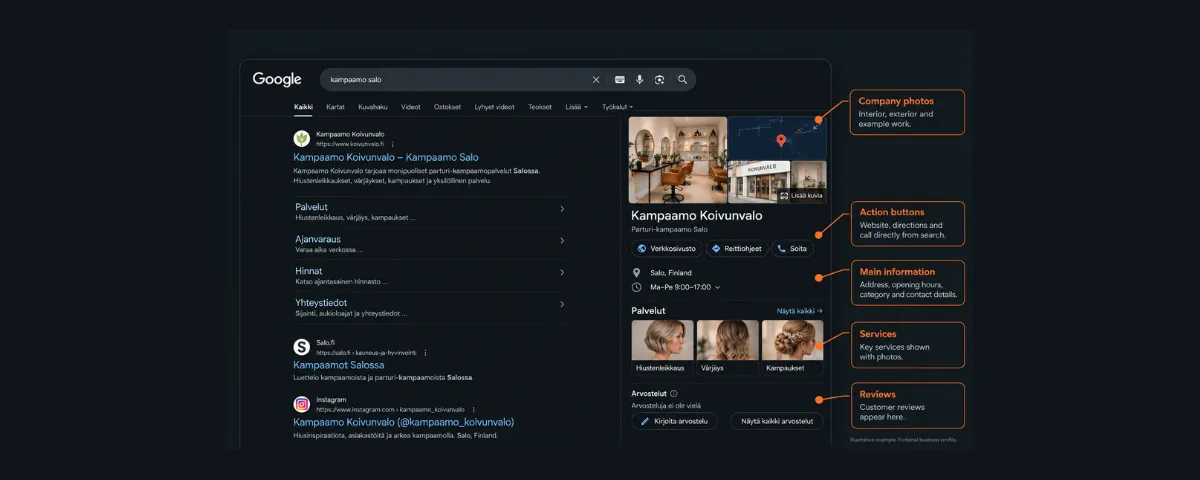
Imagine someone searches for kampaamo Salo — Finnish for “hair salon in Salo”.
Google may show several nearby salons on a map. Customers can compare locations, opening hours, photos and ratings. When someone searches for one particular business by name, Google may display a more detailed information panel.
Depending on the business and which features are available, the listing may let people:
- call the company;
- get directions;
- visit its website;
- browse photos and services;
- check opening hours;
- read customer reviews;
- follow a booking link, if one has been added and the feature is supported.
On desktop, a business information panel often appears beside the search results. The mobile layout is different, and shortcuts such as Call and Directions are especially convenient: people do not have to copy an address or phone number.
Keep in mind that Google does not necessarily display the same business listing to every person in exactly the same way. What appears can depend on the query, the person's location, their device and other factors.
Why do I need a Business Profile if I already have a website?
A website and a Google Business Profile serve different purposes.
Koivunvalo's website can explain its haircuts and colouring services, publish prices, show examples of the stylists' work and offer online booking. The Business Profile helps someone locate the salon on a map, check whether it is open and quickly reach those details.
Imagine someone who has recently moved to Salo. They do not know the names of local salons yet, so they search for kampaamo lähellä — “hair salon nearby”. They might discover a few options on Google Maps and then visit the website of the one that catches their attention.
A Business Profile does not replace a website, and a website does not replace a Business Profile. One helps people discover and contact you; the other gives them a fuller picture of your services and a way to use them.
You do not need a website to create an eligible Google Business Profile. Equally, having a website does not automatically mean your business has a listing on Google Maps.
Who is eligible for Google Business Profile?
Before creating a profile, check one essential condition: Google Business Profile is intended for businesses that make in-person contact with customers.
That includes shops, cafés, hair salons, clinics, workshops and offices where customers genuinely visit. Some businesses that travel to customers — such as cleaners, plumbers or photographers who work on location — may also qualify.
A business operating entirely online, without a customer-facing location or in-person visits to customers, is generally not eligible.
There is a specific option for people who run their business from home. If you actually visit customers, you may be able to list a service area and hide your residential address from the public profile. But you cannot present a home office where no customers are received as a walk-in business location.
You also cannot use a fictional address in another city, substitute a post-office box for a real customer-facing location or create a separate listing for every city you occasionally serve.
If your business both welcomes customers at a real location and visits them elsewhere, Google may treat it as a hybrid business. In that case, the publicly displayed location must genuinely serve customers during its stated business hours.
For full eligibility requirements, consult Google's Business Profile guidelines.
A note for business owners in Finland
If you run a toiminimi (sole proprietorship) or an osakeyhtiö (limited liability company), you are probably familiar with a Y-tunnus, the Finnish Business ID.
You can check registered business information in YTJ, the Finnish Business Information System. During verification, Google may request evidence that the business exists and that you are authorised to manage it. Business documents or your Y-tunnus may be useful to have on hand, but a Finnish Business ID does not replace verification by Google.
There is also an important privacy detail. Contact information filed as public business information in Finland can be available through YTJ. Hiding a home address from your Google Business Profile does not automatically remove it from Finnish public registers.
When submitting company details to YTJ, postal addresses and visiting addresses are treated as separate information. Contact details entered as public information may appear in company searches; there are, however, exceptions concerning the public display of names and addresses for some sole proprietors. If you want to avoid making your home address publicly available, check the rules before submitting or updating registration details. PRH and YTJ explain how business addresses and contact details are published.
It would also be misleading to claim that Google necessarily creates Business Profiles directly from YTJ records: Google's official documentation does not establish that specific connection.
First, check whether your profile already exists
Let's start with a simple search for our example salon:
Kampaamo Koivunvalo Salo
Check Google Search and Google Maps. If you find a listing, look at the address, phone number, business category, hours and photos.
Next, find out who manages it. Depending on the circumstances, Google may show an option such as Claim this business, Own this business, or a prompt to verify the business. The wording can vary with the interface language and profile status.
If the profile has not been claimed, follow Google's on-screen instructions. If another account already manages it, do not create a duplicate — request access instead.
What if someone else manages the profile?
For a business with a physical location where customers visit, Google's official ownership request process is broadly as follows:
- Go to business.google.com/add.
- Search for your business by name and address.
- Select its existing profile.
- If Google indicates that someone else manages it, select Request Access.
- Fill in and submit the ownership request.
Google sends an email after the request, and the current owner normally has three days to respond. You can check the status using the link in that message. An accepted request gives you access; if it is rejected, you may be able to appeal. If there is no response, Google may offer another way to verify the profile, but this is not guaranteed.
Businesses that only visit customers, rather than serving them at a physical location, may need to follow a separate ownership request process through Google support.
If you have lost access, do not try to bypass the process by creating several identical listings. That usually makes the situation more complicated.
You can find the official steps in Google's guide to requesting ownership of a Business Profile.
How to create a Business Profile from scratch
Suppose you have checked and Koivunvalo does not yet have a listing. Its owner can visit Google Business Profile and begin the setup process.
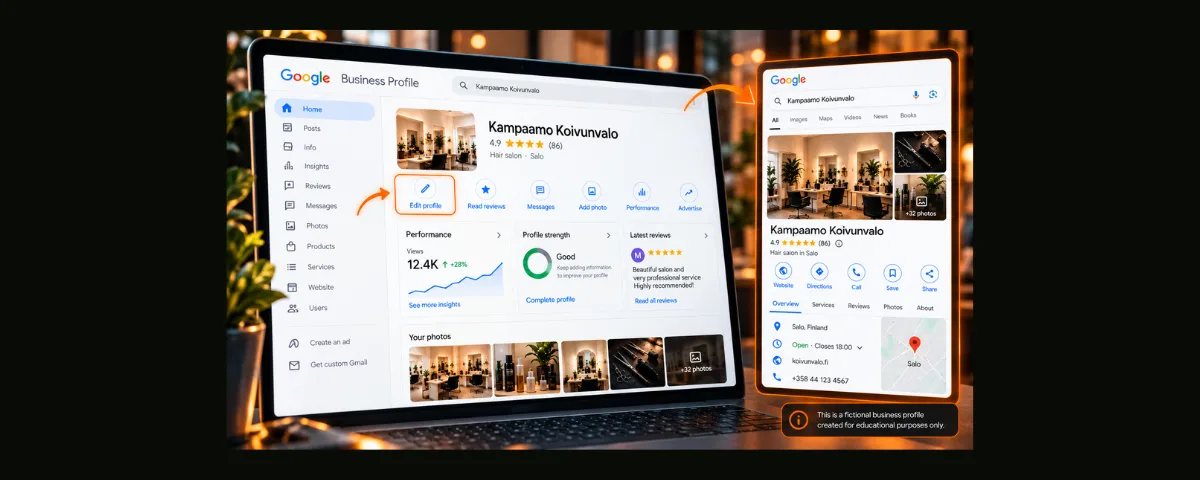
1. Enter your real business name
Use Kampaamo Koivunvalo, the name customers actually see on the salon's website and signage.
Do not add a string of services or promotional claims such as “best hair salon in Salo” to the business name. Google provides separate fields for categories, services, contact information and opening hours.
2. Choose the main business category
This is one of the most important decisions in the setup process.
Google provides a predefined selection of categories rather than an open field where you can invent your own. Choose the category that best describes the business itself, not each service it offers.
For a salon providing haircuts, colouring and styling, Hair salon would be a sensible primary category. If the business mainly offers barbering services, Barber shop may be a better match. Beauty salon covers a wider range of services and should not be chosen simply because it sounds broader.
If the company genuinely operates in more than one category, you can add relevant secondary categories. But do not use the category list as a place to stuff keywords.
If you cannot find an exact category, Google recommends choosing the closest available general category. You cannot create a custom category.
Categories can be changed later, but some changes may trigger reverification. It is worth choosing carefully rather than experimenting with categories every week in the hope of improving rankings.
3. Provide your location or service area
If Koivunvalo welcomes customers into a salon, it should give its real address.
If you visit customers and do not receive them at your home, use the appropriate service-area setup and hide your address if eligible.
In either case, the information must reflect how the business actually operates.
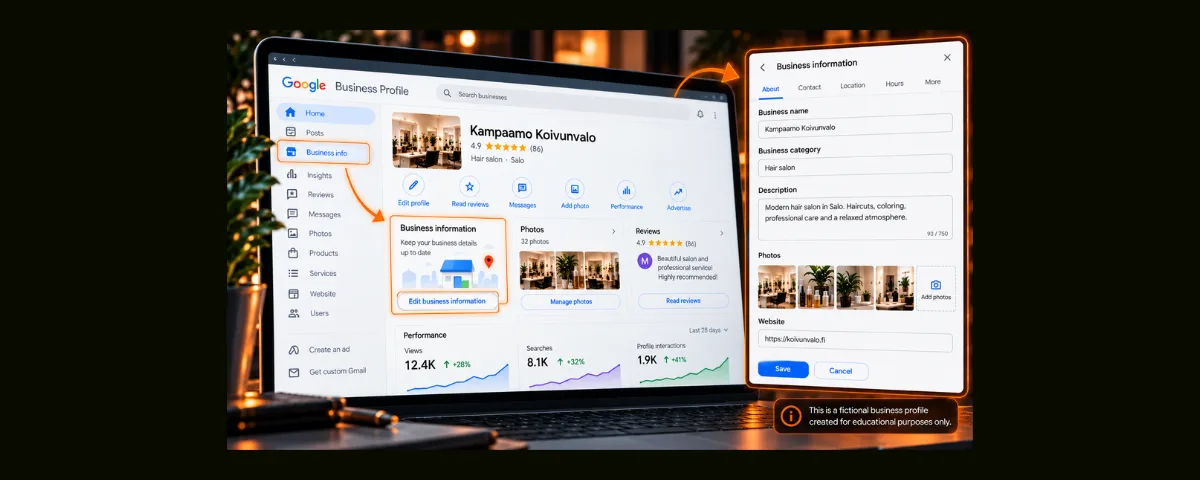
4. Add contact details and opening hours
Provide a phone number, website if you have one, regular opening hours and special hours for holidays. If your website still displays an old number, update it there too. Customers should not have to guess which contact details are correct.
5. Verify your business
Google decides which verification methods are available to a particular business. These may include video recording, a phone call, email, a postcard or another method offered by the system. In some cases, more than one step is required.
For video verification, you may be asked to show the actual location, equipment, signage and evidence that you manage the business. The evidence required for a service-area business may be different.
There is no universal rule requiring a sign to be written in Finnish. What matters is demonstrating that the business is genuine and that its details are accurate, not choosing a particular language for the sign.
Verification can take time. If Google only offers video verification, you cannot simply switch to another method at will. Follow the instructions for your profile and contact support if necessary.
See Google's official verification guide.
Your profile is verified. What should you add next?
Completing the required fields is only the beginning of making the listing useful to customers.
Koivunvalo's owner could add actual services such as haircuts, colouring, styling and hair treatments. For some business categories, Google also allows more detailed service descriptions and prices; the available options can vary by business type and region.
Keep the description straightforward. For example:
Kampaamo Koivunvalo on Salossa toimiva parturi-kampaamo, joka tarjoaa hiustenleikkauksia, värjäyksiä ja kampauksia ajanvarauksella.
In English: “Kampaamo Koivunvalo is a hair salon in Salo offering haircuts, colouring and styling by appointment.”
That tells someone whether the salon is relevant to their needs. It is more useful than grand promises or repeating the city's name ten times.
Photos: your uploads and your customers' uploads
For a hair salon, useful photos might show the entrance, interior, workstations and examples of hairstyles. Choose genuine, recent images that still look clear on a small phone screen.
But the owner does not fully control the photo gallery. Visitors can upload images too, and Google decides which photos to show in different places.
You can report a photo that breaks Google's policies. Generally, though, you cannot have an otherwise acceptable customer photo removed just because you dislike it. The same goes for the main image: uploading your preferred cover photo does not guarantee Google will always display it first.
Reviews: more than a star rating
Imagine a customer writes that a stylist took time to discuss the haircut they wanted. That tells potential visitors something more meaningful than a generic advertising slogan.
You can invite customers to leave honest reviews. What you must not do is buy ratings, encourage only positive reviews or offer rewards in exchange for a particular score.
Business owners can respond to reviews. If a review violates Google's policies, you can report it. You cannot simply delete an unfavourable review yourself.
Posts and updates
Google Business Profile allows businesses to publish Updates, Offers and Events. Koivunvalo could use a post to explain a holiday schedule or announce a new service.
These are useful ways to inform people, but they do not require daily activity and should not be presented as a guaranteed way to improve local rankings.
Google archives ordinary posts older than six months if they do not have a specified date range. Important practical information should therefore remain in the appropriate fields: address, phone number and opening hours belong in their dedicated sections.
What about questions and answers?
Google's questions-and-answers features in Maps are changing, and their availability can depend on the interface and region. For that reason, it is unwise to build a permanent set of instructions around one specific Q&A button.
A better starting point is to make sure your services, contact details and opening hours are complete. Then check what question-related features are currently available for your own listing.
What determines local search visibility?
Imagine there are ten hair salons in Salo, all with Business Profiles. Why does Google show them in a different order to different people?
Google identifies three broad factors in local ranking:
- Relevance. How closely the business matches what someone is searching for.
- Distance. How far the business is from the searcher or the location mentioned in the query.
- Prominence. How well known the business is, based on information available online, including links, reviews and ratings.
Improving how easily people can find a business when searching in a particular town or area is called local SEO.
Complete, accurate business details help Google understand what a company offers. But creating or professionally optimising a Business Profile does not guarantee the top position. Google also explains that businesses cannot pay for better placement in ordinary local results.
A realistic goal is not to “beat every competitor in a week”. It is to make your business information accurate, accessible and useful to people who are searching nearby.
Can your website support your Business Profile?
Yes — a website provides another source of clear information about your business.
Make sure the business name, contact details, address and description of services are consistent between the website and the profile. Customers should not encounter conflicting opening hours or phone numbers.
A developer can also add LocalBusiness structured data to your website. This is a type of markup that helps search engines understand information about a business. It is not a paid Google feature, and it is not a magic connection that boosts both the website and the profile in search results.
Structured data does not replace creating or verifying a Google Business Profile, nor does it guarantee special search features.
How can you tell whether your profile is useful?
A verified Business Profile provides a Performance section, accessible through the business management experience in Google Search or Maps.
Depending on the business category, available metrics can include profile views, search queries, website clicks, clicks on the call button and requests for directions.
Let's imagine Koivunvalo's report for one month shows:
- 600 profile views;
- 35 website clicks;
- 12 clicks on the call button;
- 8 requests for directions.
These are fictional figures, not real business results. Twelve call-button clicks do not mean twelve new customers; the metric does not even prove that twelve phone conversations took place.
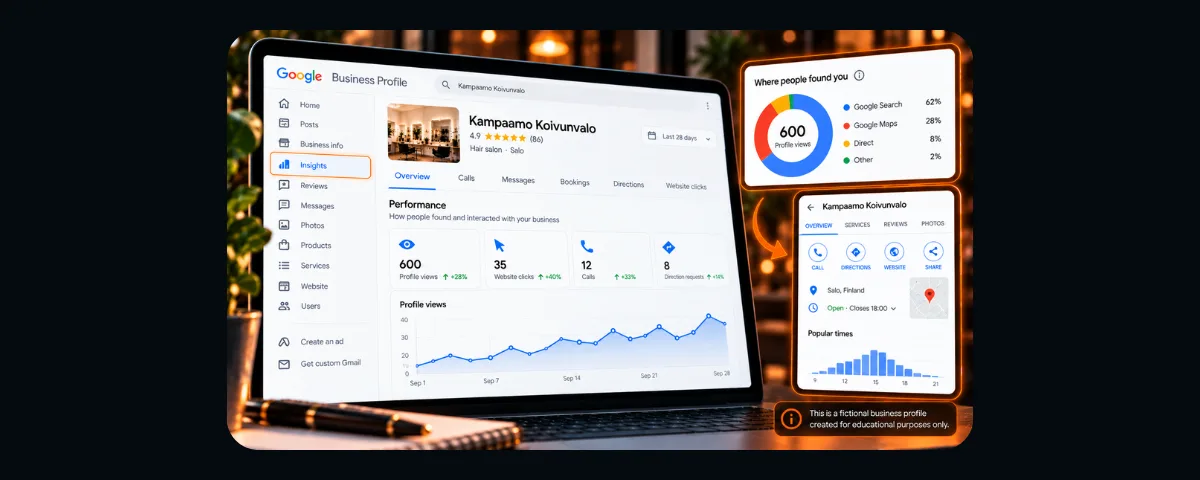
Profile views in Performance are not the same as the total number of times your business appeared anywhere on Google, and individual interactions can be measured differently. Checking results monthly and comparing similar periods is a reasonable starting point.
There is also no universal benchmark for the number of views a profile should receive. A small specialist studio and a salon in a busy shopping centre will naturally have very different circumstances.
The more useful question is how those figures connect with your day-to-day business. You might politely ask new customers how they found you or track appointments made through the website. That makes Google's numbers more useful for real decisions.
Do you have to manage the profile constantly?
No. Most small businesses do not need to publish updates every day.
But it is worth checking the profile regularly. If Koivunvalo moves, changes its phone number or closes for a holiday, customers should see accurate information.
Imagine someone driving to the address shown by Google and finding a locked door. The issue is not SEO; a customer has simply wasted their time.
For a small business, reviewing the listing once a month — and whenever something changes — is a practical habit. Respond to reviews, update photos as needed and look for incorrect details.
Quick checklist: check your own business
Open Google and go through these questions:
- Can people find my business by its name and city?
- Do I have access to manage the profile, or do I know how to request it?
- Does the business name match the name I actually use?
- Does the primary category accurately describe my business?
- Is the address or service area correct?
- Is my home address hidden if I only visit customers and do not receive them there?
- Are the phone number, website and opening hours up to date?
- Do the description and services clearly explain what I offer?
- Are there useful, genuine photos on the profile?
- Do I monitor reviews and changes to business information?
- Do I know where to find Performance when I need it?
Not every item applies to every business. For example, a purely online company without in-person customer contact may not be eligible for a Business Profile at all.
Should you hire someone to set it up?
You can create and manage Google Business Profile yourself for free. For a straightforward salon or shop with a genuine location, the basic setup is manageable without outside help.
Professional support may be worthwhile if an old listing is controlled by an unknown account, verification keeps failing, duplicate profiles exist, the address is displayed incorrectly or the business information needs to be coordinated with the website.
If you hire someone, keep primary ownership under your control or that of an authorised representative of your company. For most routine tasks, an external provider only needs manager access. That allows you to change providers without losing control of your listing.
And remember the difference between Google's free service and a third party's paid work. Someone can charge for an audit, setup or ongoing management — but not for the basic right to appear on Google Maps.
Where should you start today?
Go back to the little experiment at the beginning. Search for your business by name and look at the result as if you were hearing about the company for the first time.
Is it immediately clear what you do? Where you are? When someone can visit? How to call or book an appointment?
If there is no listing, first check whether the business is eligible. If one already exists, find out who manages it. Perhaps all you need to do is update your hours and add a few photos. Or perhaps you need to regain access.
The important thing is not to treat your Business Profile as an advertising trick that should instantly bring in a stream of new customers.
Above all, it is accurate information about a real business, available when people are looking for that business.
PixelCraft helps small businesses in Finland build and maintain their online presence, from websites and contact information to checking and setting up Google Business Profile. But the very first check is something you can do yourself — today.
Frequently asked questions
Is Google Business Profile really free?
Yes. Creating and managing your own Business Profile is free. A specialist may charge for setup or ongoing management services.
Do I need a website to create a profile?
No. The important thing is that your business meets Google's eligibility requirements. A website is still useful for detailed services, prices and online booking.
Can I hide my home address?
Yes, if your business qualifies as a service-area business and you do not receive customers at that address. This does not automatically hide information published in Finnish public registers.
I have a Finnish Business ID (Y-tunnus). Is that enough?
No. A Y-tunnus by itself does not establish eligibility or replace Google's verification process. What matters is how your business operates and whether it passes the relevant checks.
Someone else manages my listing. What should I do?
Do not create a duplicate. Follow Google's Request Access process through business.google.com/add. The current owner normally has three days to respond; your next steps depend on the outcome.
Can I remove a negative review?
You cannot remove a review simply because it is negative. If it violates Google's policies, you can report it. You can also respond publicly.
How often should I publish updates?
There is no mandatory posting schedule. Publish useful information when you have something relevant to share. Accurate hours, services and contact details matter more than posting for the sake of it.
Can someone guarantee my business will rank first on Google Maps?
No. Local positions depend on relevance, distance, prominence and Google's ranking systems. No professional can promise a permanent first-place listing.
Read also
To understand how search engines discover and evaluate websites, read “What Is SEO and Why Does Your Business Need It?”.
For indexing checks and search queries, see “Google Search Console: How to Know If Google Sees Your Website”.
If you are deciding how to build a business website, read “WordPress, Website Builder or Custom Development: Which Is Right for Your Business?”.
For a practical breakdown of website budgets in Finland, see “How Much Does a Website Cost in Finland in 2026?”.
And if you are thinking about building a site with AI, read “Why Pay a Developer If AI Can Build a Website?”.
Sources and methodology
This article was prepared on October 10, 2026. Its guidance is based on official Google Business Profile documentation and Finnish sources about business registration. Google's interface and the availability of individual features may change, so always check the current instructions when working on a real profile.
Kampaamo Koivunvalo is a fictional example business. All business listings, reviews, addresses and performance figures shown in the illustrations are for demonstration only and do not represent an actual company. The images are educational mockups rather than exact Google interface screenshots; the placement of controls and available features may differ. No real Business Profile has been created for Koivunvalo.
Primary references:
- Google Business Profile — Guidelines for representing your business
- Google Business Profile — Request ownership of a Business Profile
- Google Business Profile — Verify your business
- Google Business Profile — Manage your business category
- Google Business Profile — Create and manage posts
- Google Business Profile — Local ranking
- Google Business Profile — Performance metrics
- Google Business Profile — Third-party policies
- Google Search Central — LocalBusiness structured data
- Google Business Profile — Eligibility and service-area rules
- YTJ — Company search
- YTJ — Address and contact details
- YTJ — Company search and privacy exceptions